GDG Hanoi photo gallery
Data model & API designs
This post is a part of a series of posts about my design process for a photo gallery service for GDG Hanoi. You can find the introduction post here: Introduction.
Overview
The data flow plays an essential role in forming the bonding structure between components of the service.
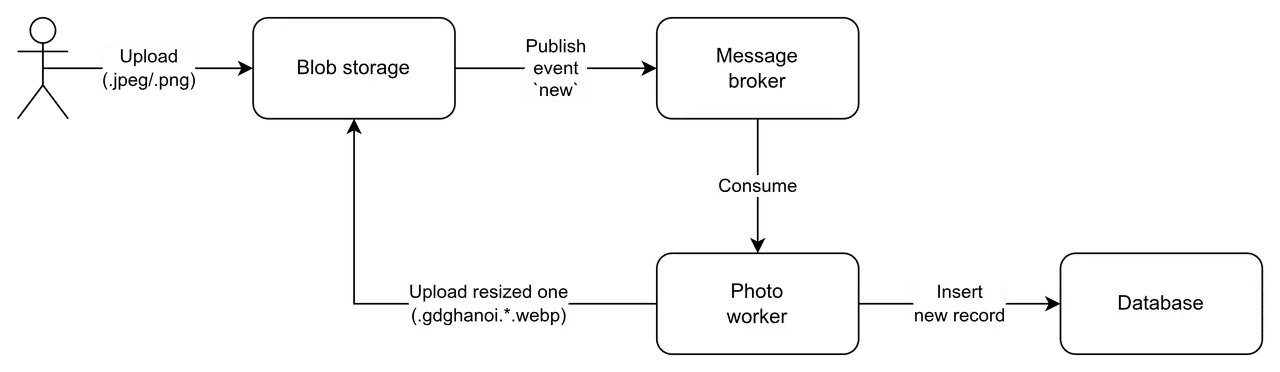
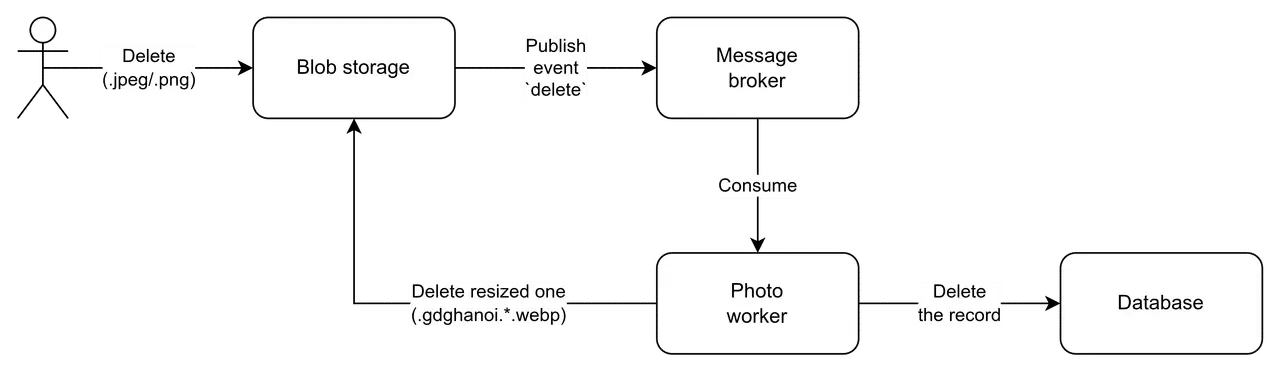
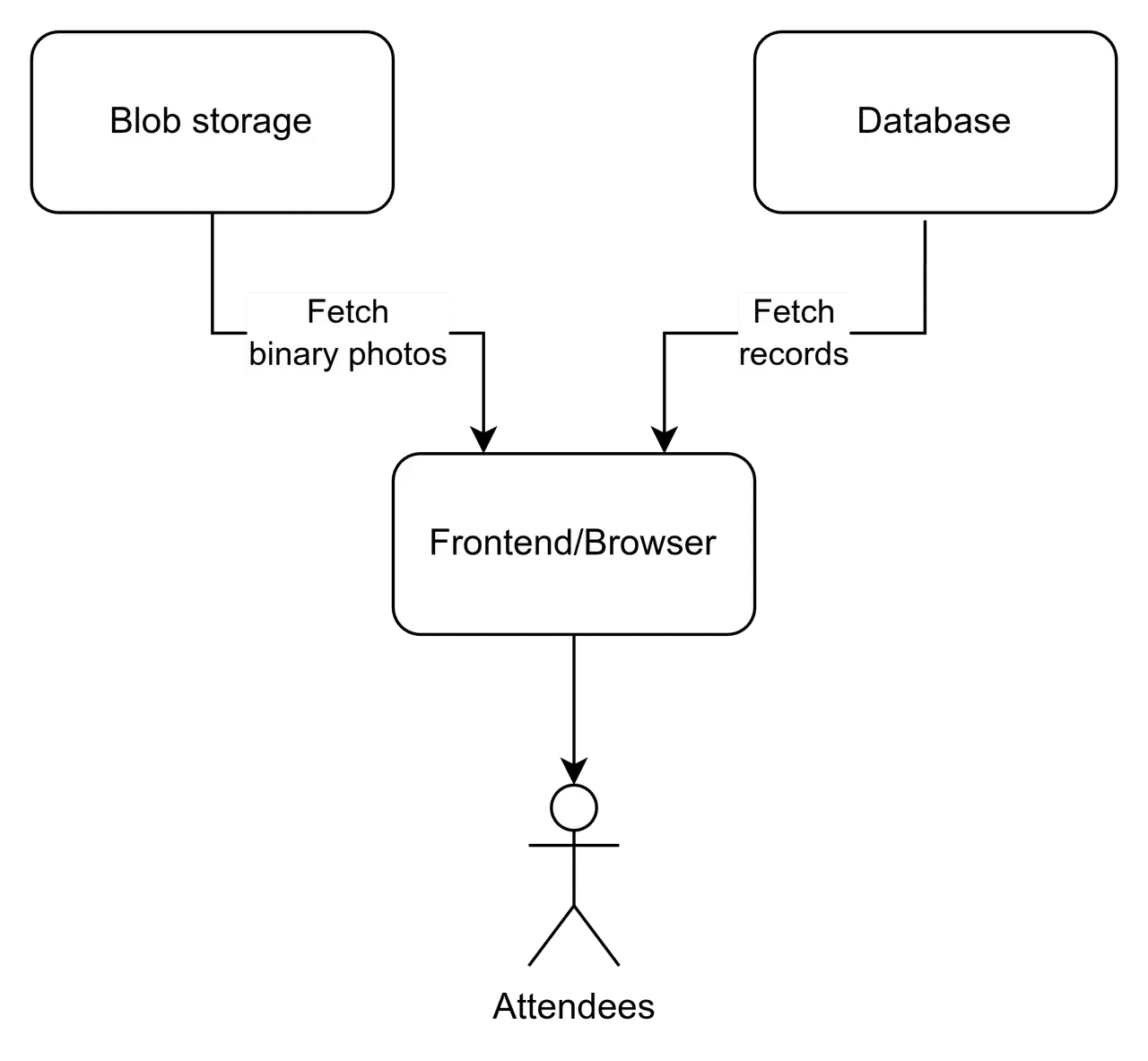
The diagrams below illustrate the photo entity’s journey in uploading, deleting, and reading operations.
Uploading
Deleting
Reading
Responsive image data
Before diving into the data model, I will briefly introduce how I utilize responsive images on a browser.
Because the gallery is designed to serve many images while each image comes with different rendered
sizes depending on the screen breakpoints, I decide to use responsive images with the resolution
switching technique (using HTML <img>’s srcset and sizes attributes).
An example HTML code for this technique is as follows:
<img
  alt="Alt description"
  decoding="async"
  loading="lazy"
  sizes="34vw"
  srcset="
    /galleries/2026/bwai/sample.gdghanoi.320.webp   320w,
    /galleries/2026/bwai/sample.gdghanoi.512.webp   512w,
    /galleries/2026/bwai/sample.gdghanoi.768.webp   768w,
    /galleries/2026/bwai/sample.gdghanoi.1024.webp 1024w,
    /galleries/2026/bwai/sample.gdghanoi.1280.webp 1280w,
    /galleries/2026/bwai/sample.gdghanoi.1600.webp 1600w,
    /galleries/2026/bwai/sample.gdghanoi.2048.webp 2048w,
    /galleries/2026/bwai/sample.gdghanoi.2560.webp 2560w
  "
  src="/galleries/2026/bwai/sample.gdghanoi.webp"
/>
For those unfamiliar with this concept, responsive images with resolution switching are images that are designed to address the problem:
How to tell the browser to only load the images that provide “just enough” size & quality for the user’s device and network condition, not too big or not too small?
Imagine using a mobile device with only a 360px viewport width; there is no reason to load an image that is 2560px wide. Right?
You can learn more about the responsive images at MDN’s guide.
Schema
Up to this point, I can list the factors that influence the photo entity data:
- The gallery layout needs photos’ aspect ratio, width, and height to properly display them.
- The responsive images need a list of sources and their metadata (width and height) to construct
the
srcset. - The infinite scroll pagination needs timestamp data to perform the traversal.
- The page-based pagination needs a manual page attribute due to Firestore’s limitation to perform document queries by page.
- The photo entity needs:
- An event code attribute enabling querying by a GDG Hanoi’s event.
- A base source URL to assign to the
srcattribute of the image element. - A original key to lookup the original image, which is used to perform downloading or deletion.
Based on the factors, I will design the schema via the table below:
| Attributes | Data types | Descriptions |
|---|---|---|
| src | string | A base source URL |
| w | int | Photo’s natural width in pixels |
| h | int | Photo’s natural height in pixels |
| ts | int | Unix timestamp of photo upload |
| page | int | Page number |
| code | string | GDG Hanoi’s event code |
| origin_key | string | Blob storage key of the original photo |
| srcsets | array | List of srcset images |
| srcsets.[].w | int | Width of a srcset image |
| srcsets.[].h | int | Height of a srcset image |
| srcsets.[].url | string | URL of a srcset image |
Key naming convention
On the blob storage side, to look up the source URLs and the files themselves easily, I come up with the following convention:
galleries/{year}/{event_code}/{photo_id}{?size_enum}.{ext}Where:
year: the 4-digit year of the event.event_code: the event code, which is a short string that represents the event.photo_id: the photo ID, which is a unique identifier for the photo.size_enum: the size enum, which is a string that represents the size of the photoext: the file extension
Here is a typical example of a photo entity:
Original key: galleries/2026/bwai/abcxyz.png
Resized keys:
  - galleries/2026/bwai/abcxyz.gdghanoi.webp
  - galleries/2026/bwai/abcxyz.gdghanoi.320.webp
  - galleries/2026/bwai/abcxyz.gdghanoi.512.webp
  - galleries/2026/bwai/abcxyz.gdghanoi.768.webp
  - galleries/2026/bwai/abcxyz.gdghanoi.1024.webp
  - galleries/2026/bwai/abcxyz.gdghanoi.1280.webp
  - galleries/2026/bwai/abcxyz.gdghanoi.1600.webp
  - galleries/2026/bwai/abcxyz.gdghanoi.2048.webp
  - galleries/2026/bwai/abcxyz.gdghanoi.2560.webp
Maintaining the page attribute
Because the database (Firestore) does not support offset-based queries, I have to maintain the paging behavior manually via write operations on the photo collection.
Inserting operation
On inserting a new document, I have to do the following steps:
- Query the highest active page number.
- Decide to use the highest page number, or increment it by one as registering the document to the next page.
- Insert the photo document with the decided page number.
Consequently, the service have to perform 1 read and 1 write operation for a single insert.
Deleting operation
This operation is a bit tricky. Because it causes a gap in the actual document count per page.
The good thing is, this gap does not cause any serious effect on UX, so I can let it as be on production.
Later on, I can set up a batch job to reorganize the page numbers if too many documents are deleted and the gap becomes too large to ignore.
API
There are 4 major operations for the gallery service; I will design an API specification for each of them:
- Uploading photos
- Deleting photos
- Listing photos by a cursor timestamp
- Listing photos by a page number
The API implementation may be varied depending on the communication protocol between frameworks. Thus, in this section, I conveniently describe the specifications by a consistent language, which is Protocol Buffers.
Uploading photos
This API is used on the uploader frontend component, in which the admin can upload photos directly to the cloud storage with presigned URLs that follow the object key naming convention described earlier.
edition = "2023";

message UploadRequest {
  repeated bytes files = 1;
}

message UploadResponse {
  bool ok = 1;
}
Deleting photos
This API is used on the uploader frontend component, in which the admin can delete photos from the service.
It takes the object’s original key to perform the delete operation on the photo entity. The API does:
- Deleting the photo document from the database.
- Deleting all the resized photos from the blob storage.
- Deleting the original photo from the blob storage.
edition = "2023";

message DeleteRequest {
  string key = 1;
}

message DeleteResponse {
  bool ok = 1;
}
Listing photos by a cursor timestamp
This API is used on the gallery frontend component, in which the gallery is rendered as infinite-scroll mode.
It takes a cursor timestamp as the input and returns a list of photos ordered by the timestamp in descending order. If the cursor is omitted, it fallbacks to the pre-defined latest timestamp and retrieves the first chunk of photos.
Besides the photos list, it also returns the next cursor timestamp to be used for the next query.
edition = "2023";

message Image {
  ...
}

message ListRequest {
  int64 cursor = 1;
  string code = 2;
}

message ListResponse {
  repeated Image records = 1;
  int64 next = 2 [default = -1];
}
Listing photos by a page number
This API is used on the gallery frontend component, in which the gallery is rendered as page-based mode.
Because the page is set statically into a photo document in the database, this API only takes the page number as the input and returns a list of photos containing the given page number.
edition = "2023";

message Image {
  ...
}

message ListRequest {
  int64 page = 1;
  string code = 2;
}

message ListResponse {
  repeated Image records = 1;
}